Tricking the college firewall to play some games
Introduction
My roommate wanted to play Valorant on our college Wi-Fi because the mobile hotspot was very unstable at our place but Voila, our college Wi-Fi blocks almost all the games. He asked me if I could do something about it.
Disclaimer: This article is for educational purposes only. Bypassing institutional firewalls may violate your college's policies. Please use this information responsibly.
First Attempt - Hit and Trial
I asked him to just login in to the game via mobile hotspot and then connect college Wi-Fi as I thought they won't be blocking the actual game servers instead the game downloading websites.
Turns out this didn't work. Why ? It turns out college Wi-Fi blocks the UDP traffic entirely. As most games use UDP, a smart way to not allow students to play games would be to block it entirely.
Second Attempt - Using a VPN
So I asked him to use a VPN. But most VPNs works on UDP so that would not work and cost was also a big issue for us broke kids. So I spun up nano EC2 instance on AWS and made my own VPN on TCP using OpenVPN.
The TCP VPN was not good as expected because TCP does 3-way handshake thus, it was too hard to maintain low latency for our use case of games and download and upload speeds were also comparatively very low.
Third Attempt - Tricking the Firewall
After a bit of research, I thought of tricking the firewall using FakeTCP. The firewall only checks the headers of the packet, and not the content itself. FakeTCP works by spoofing the headers of a TCP packet while actually carrying a UDP packet. We do some kernel level configuration changes so that our OS does not automatically do TCP handshake for us, instead we handle it using a client and server software that relay packets.
For this I used udp2raw.
So I set this up with WireGuard taking all my network connection on host and then forwarding to udp2raw client then it passing to server udp2raw client and then that passing to WireGuard instance on that server which finally then forwards it to the internet.
# On the Client side
./udp2raw_amd64 -c -l0.0.0.0:3333  -r$SERVER_IP:4096  -k "passwd" --raw-mode faketcp -a
# On the server side
./udp2raw_amd64 -s -l0.0.0.0:4096 -r 127.0.0.1:6969    -k "passwd" --raw-mode faketcp -a
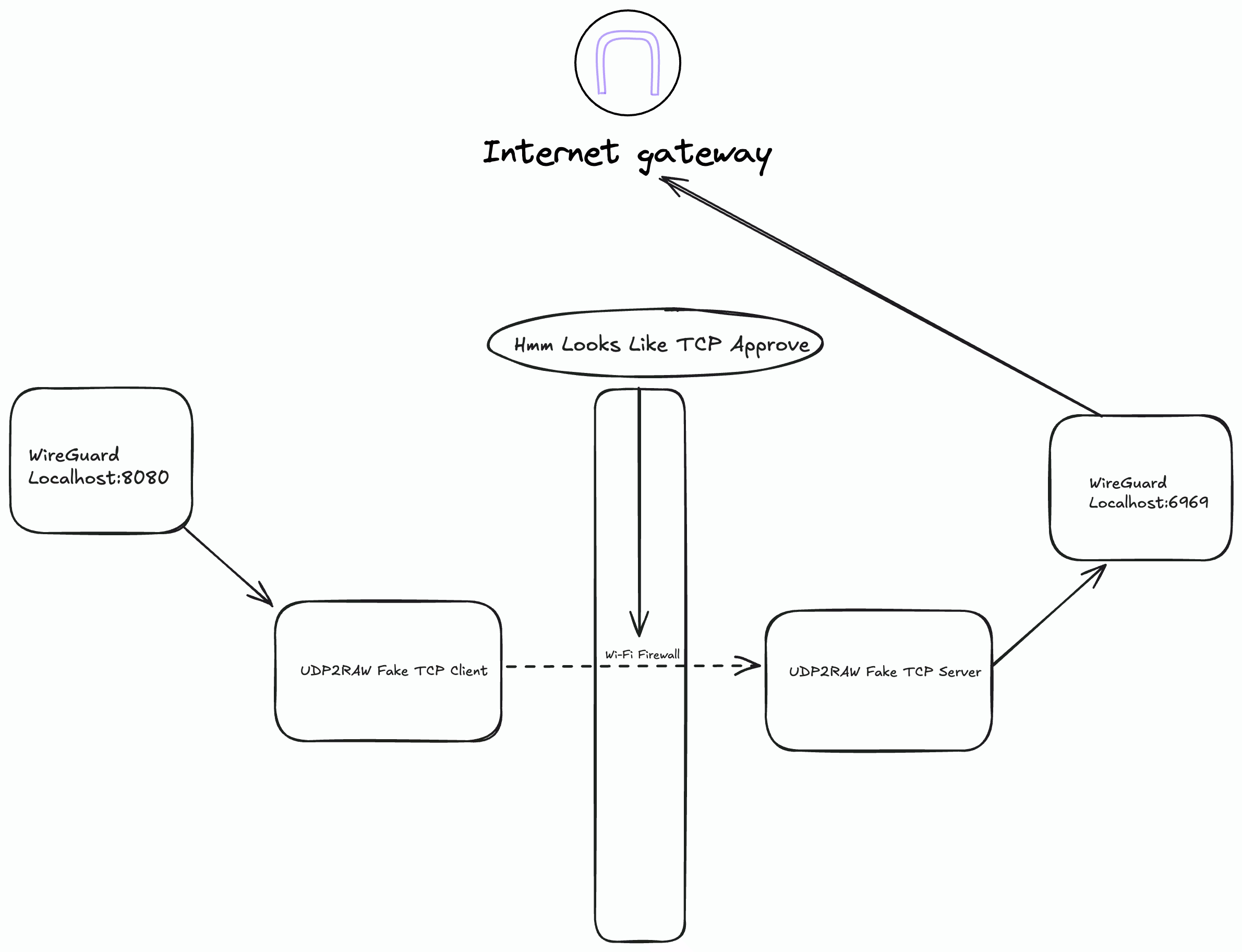
This worked and was great improvement compared to previous attempt.
NOTE
If you have Linux machine, you can use phantun too as it is faster and newer than udp2raw on benchmarks and is written in rust but it only supports Linux as it does kernel level changes. I believe it can work on macOS, but I haven't tried it.
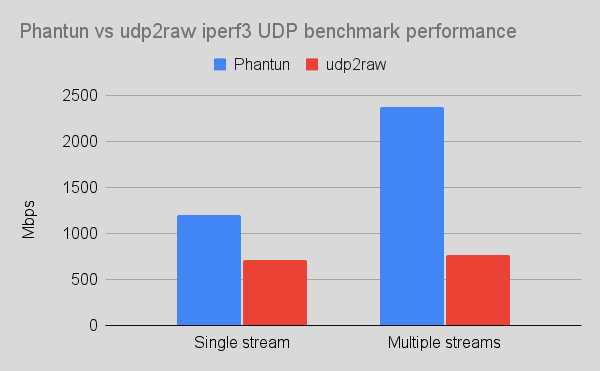 Benchmark image source: Phantun
This still was not perfect but it was pretty good for a while.
Attempt 4 - I got lucky !
One day I was doing nmap on my college Wi-Fi and found out that port 443 was open on UDP wow 😭.
I quickly tried setting up OpenVPN with port 443 on UDP and Voila! it worked. Then I tried it using WireGuard but it failed. I still couldn't fully understand why it worked with OpenVPN but not WireGuard but it works fine for now.
Now the VPN speeds are very fast and latency is also very low. We can see 1-2 % packet loss in Valorant but that was expected as we are using UDP.
Final Words
Well this was a fun exercise and I learned a lot more about network protocols than I ever intended to !